Friday, June 30, 2006

PGC Anoto Convelus routing med maxell dp-201 och usb dongle belkin F8T012 Anoto Components

Dokumentationen om hur man kommer igång med covelus routing (efter att ha använt NBOS)

När man drar igång CovelusRouter5_2_1swing.jar i en katalog och så skapas katalogen RecordStoreWin32

För att Windows-CovelusRoutern skulle fungera behövde jag hitta den katalog dit bluetoothdongeln (F8T012) laddar upp filerna den tar emot.

På shutteln var det:
Folder-Path=%user.home%/My Documents/Mapp för Bluetooth-utbyte
På min dell på jobbet (engelsk version var det)
Folder-Path=%user.home%/My Documents/Bluetooth Exchange Folder

Belkin bluetooth software 4.0.1.2401

Det är skillnad på glas och glas


När man skall retroprojecera är det skillnad på glas och glas. Den stora glasytan till höger är beställd från Glaskompaniet AB i Uppsala och skulle vara av samma typ som den lilla sampel ytan till vänster. Den lilla glasytan vet jag inte var det är för typ av glas men jag fick den från Glaskompaniet. Den stora glasytan är av typen LACOBEL WHITE 9010 med säkerhetsfolie.

Wednesday, June 28, 2006

Launch tomcat using security manager


Todays achievement: Unchecking a checkbox.

With this checkbox, checked, access to writing logfiles and access to the DBCP apache-tomcat connectionpool does fails without any obvious errormessages in the logfiles. I got errors such as:

java.security.AccessControlException: access denied (java.io.FilePermission c:\notepad.log write)

Well it was not obvious to me anyway...

slackware 10.2 mysql config 3306 networking

In slackware 10.2 to enable network access to mysql, comment out the SKIP line in /etc/rc.d/rc.mysqld

# To allow outside connections to the database comment out the next line.
#SKIP="--skip-networking"

Tuesday, June 27, 2006

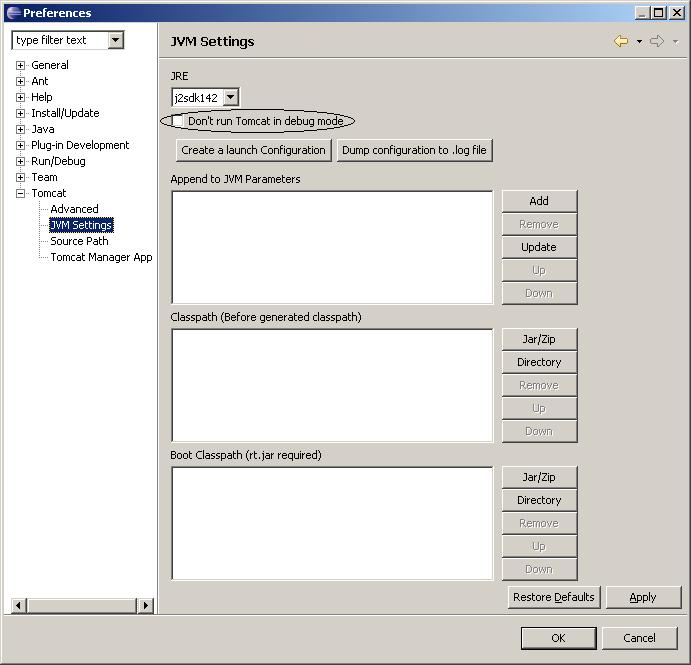
don't run tomcat in debug mode from eclipse checkbox


Now it has been a about a year since I did java servlet development in eclipse. This time I spent a day to find out how to get servlet debugging in tomcat to work from eclipse. The solution is to uncheck the default "don't box". I spent the day to try "fix it" through links such as using-eclipse-to-debug-your-tomcat-web-application

console window in eclipse

Disappearing console window in eclipse.
Lost gone not working even if removing the console window and opening an new console window

This solved it

Fixing php support in apache on slackware using swaret

To /etc/apache/httpd.conf
add
Include /etc/apache/mod_php.conf

in mod_php.conf be sure it says something like this:
# Load the PHP module: in modules.conf
#LoadModule php4_module /usr/libexec/apache/libphp4.so
# Tell Apache to feed all *.php files through the PHP module:
AddType application/x-httpd-php .php
# This will display PHP files in colored syntax form. Use with caution.
AddType application/x-httpd-php-source .phps

If it still does not work it might be dependency problems:

Check dependency problems with:
swaret --dep

I found that libxml2 and libmhash was missing:
swaret --install xml2
swaret --install mhash

And it worked

Thursday, June 22, 2006

Skillnad på ps och eps när man skall trycka anotomönster


När man skall trycka Anotomönster som man tagit fram med FDT 2.1.1 i Acrobat Professional så skapar FDT'et en .ps (postscript fil). .ps filer från FDT'et innehåller inte någon information om dokumentstorlek. För att få utskrifter större än en A4'a av min 518x688mm stora mönsteryta fick jag tips från Anoto om att använda media menyfliken i Ghostscript 4.8 och sedan välja A0 alternativt User defined... För att sedan dokumentstorleken skall sparas i filen behövde jag konvertera från .ps till .eps (File menyflik och välj PS to EPS)